AI Chat
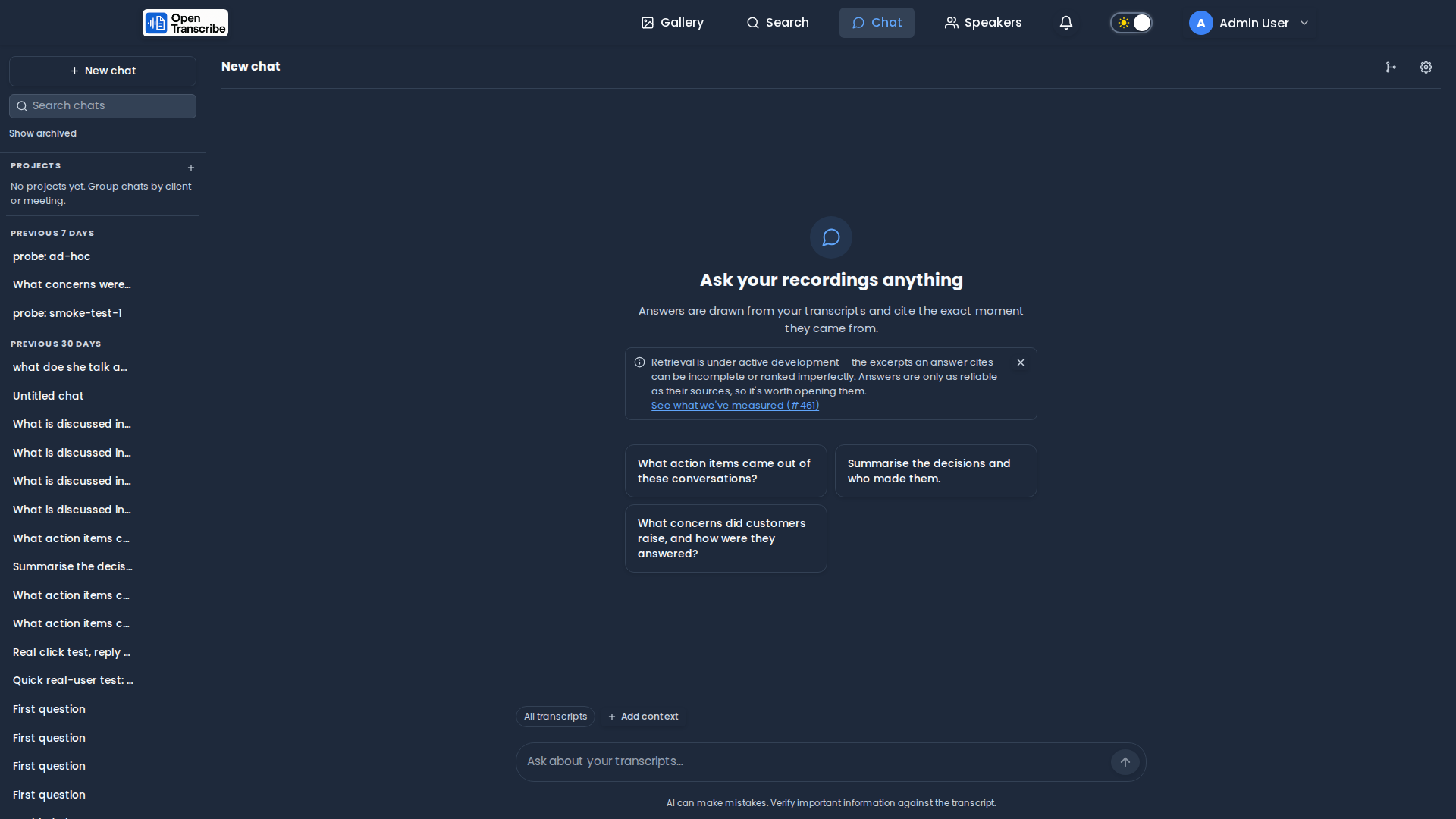
Ask questions across your recordings and get answers grounded in what was actually said, with citations that link straight to the moment in the transcript.
Chat is a first-class page in the navbar. It uses Retrieval Augmented Generation (RAG): rather than sending whole transcripts to a language model, OpenTranscribe searches your library for the passages most relevant to your question and gives the model only those, along with instructions to cite them.
What it is good for
The feature earns its keep on questions that would otherwise mean re-listening:
- "What action items came out of these three calls?"
- "What did the customer say about pricing, and how did we respond?"
- "Summarise the decisions and who made them."
- "Did anyone raise concerns about the timeline?"
Because retrieval spans multiple recordings, it is particularly useful for questions across a set of meetings — trends, recurring objections, follow-ups that were promised and never closed.
Choosing what to chat about
The bar above the composer always shows what the conversation is grounded in. By default it is All transcripts — everything you can access.
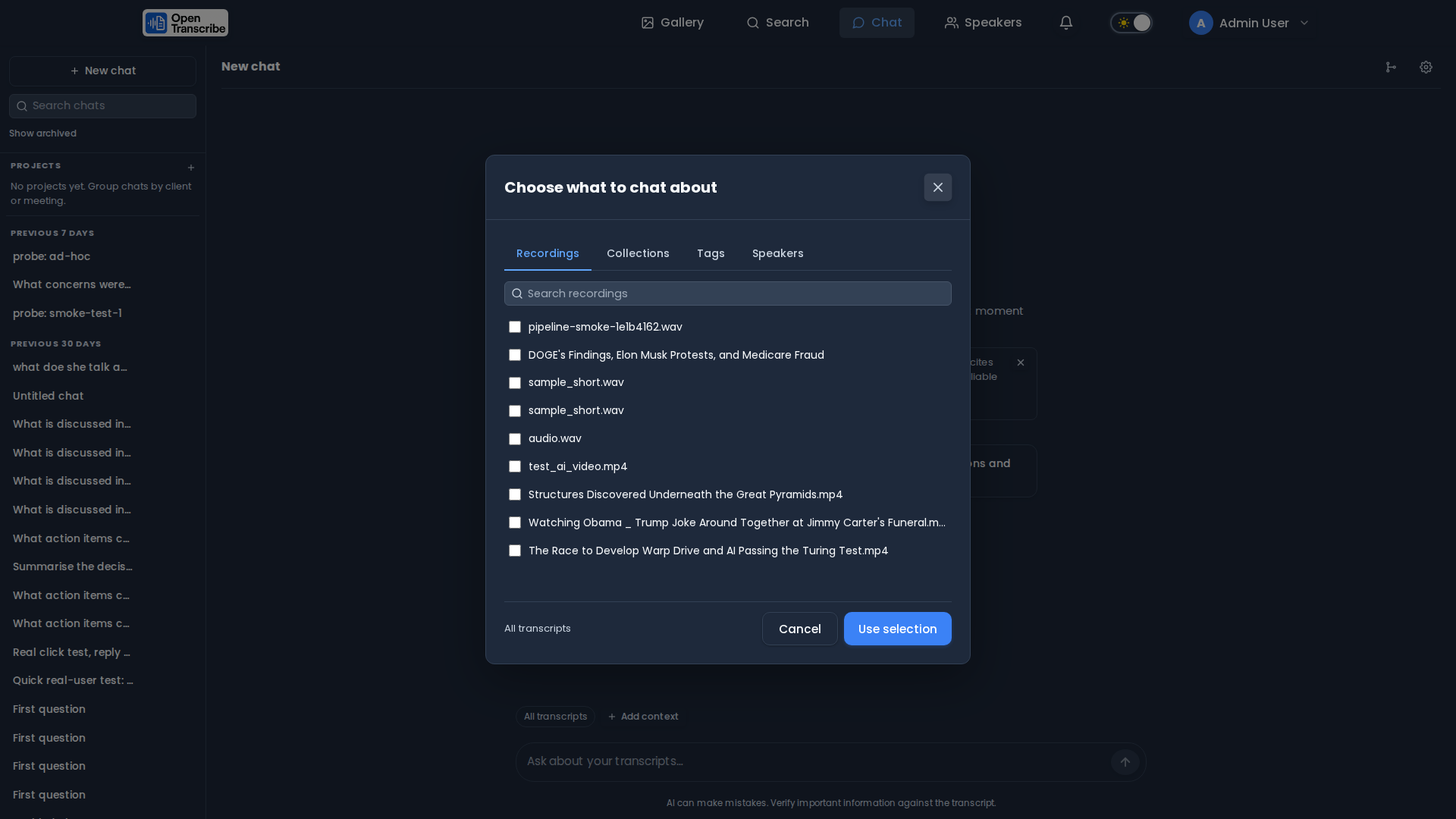
To narrow it, use Add context, which offers four ways to select:
| Tab | Use when |
|---|---|
| Recordings | You know the specific files. |
| Collections | You want a whole project or client. Membership is resolved at query time, so recordings added to the collection later are automatically in scope. |
| Tags | You organise by topic or status rather than by folder. |
| Speakers | You care about what specific people said. |
Asking about one person
The Speakers tab is the filter with no equivalent in a general-purpose document chat, and it is exact rather than approximate. Transcripts are indexed as speaker turns, so one passage is one person talking — selecting a speaker retrieves only their words.
That difference matters. Without it, "what did Dana commit to?" can be answered from a sentence in which someone else mentions Dana. With it, the answer can only come from Dana's own turns.
Speakers are a separate axis from the other three: recordings, collections and tags choose which recordings to search, speakers choose who to listen to within them. Use them together ("what did Dana say in the Q3 calls?") or on their own ("everything Dana said, anywhere"). The assistant is told about an active speaker filter, so it says a person is out of scope rather than claiming they were never discussed.
You can also start from the gallery: select recordings and choose Chat with N from the bulk actions menu.
Retrieval quality drops when a question has to compete with an entire library. If you know which meetings matter, select them — answers get noticeably more specific.
The footer of the picker estimates how much of the model's context window your selection would occupy, and warns before you pick more than the model can usefully handle.
Projects
A project groups conversations about one recurring subject — a client, a weekly meeting, a case — and pins two things every chat inside it inherits:
- Recordings. Pin a collection, some tags or specific files, and every chat started in that project searches those recordings without you re-picking context each time. This is what makes a project more than a folder: it is a retrieval boundary, which is also the safer default when several customers' material lives on one server.
- Instructions. Standing background about the subject — "this client calls their product Atlas", "always name the account manager" — applied to every chat in the project without retyping it.
Create one with + beside Projects in the chat sidebar. Each project row expands to show its conversations, and + on the row starts a new chat already scoped to it. Chats that do not belong to a project stay in the date-grouped list below, exactly as before.
Deleting a project never deletes its conversations. They fall back to ungrouped. Losing a grouping is recoverable; losing the threads would not be.
What the assistant actually sees
Understanding this is the difference between a vague answer and a good one.
The model never reads your whole library, or even a whole recording. Transcripts are split into speaker turns — one stretch of one person talking — and the assistant is shown only the handful of turns that best match your question.
A turn becomes one excerpt, with three adjustments:
- A long turn is split at about 200 words, with a 40-word overlap so a sentence spanning the split still reads whole in both halves.
- A very short turn (under 20 words — "Right.", "Can you repeat that?") is folded into the previous excerpt from the same speaker, so a back-channel never becomes a standalone result.
- Every excerpt keeps its speaker, start time and recording, which is what makes citations land on the exact moment.
For each question, retrieval pulls a pool of candidates, reranks them, and keeps roughly 12 excerpts, at most 4 from any one recording. That per-recording cap is why a two-hour monologue can't crowd out the other four meetings you selected.
The practical consequence: the assistant sees passages, not the whole story. It answers well when the answer lives in a few specific moments, and poorly when it requires reading everything end to end.
A summary needs the whole transcript; chat retrieves fragments. Use the built-in summary feature for that — it reads the entire transcript — and use chat for questions that point at specific moments.
Seeing what the assistant did — the query trace
The paragraph above describes retrieval in general. The query trace shows you what happened for this particular question.
Open it with the branch icon in the chat header. It is collapsed by default, does not move the answer when it opens, and remembers whether you left it open.
Each row is one step, and names the data it touched, what it found and how long it took:
● Rewritten      Model                       612ms
▪ Cache          miss                          1ms
● Search         chunk plane   48 found       214ms
● Reranked       12                            91ms
● Sampled        12 kept · 36 dropped · max 4/file
– Expanded       disabled
● Filtered       masking       12 kept · 0 dropped
● Budgeted       12 kept · 0 dropped
● Answered       12 excerpts
The marks matter more than they look. Six states, and three of them look identical in the answer itself:
| Mark | Means |
|---|---|
| ● Done | the step ran and produced something |
| ○ Empty | it ran and found nothing |
| – Skipped | it never ran — the row says why |
| ▪ Cached | answered from cache; the work was skipped |
| ⊘ Declined | refused on purpose, rather than guessing |
| ✕ Failed | something broke |
"Found nothing" and "never ran" produce the same answer and the same absence of citations, so without the trace there is no way to tell them apart. The same goes for Failed: if search breaks, the assistant still answers — from whatever it had — and the reply looks entirely normal. The trace is what makes that visible.
Check Sampled and Filtered. 48 found followed by 12 kept · 36 dropped
is normal narrowing. But 12 kept · 0 dropped at Filtered followed by
0 excerpts at Answered means the evidence was found and then removed — usually
by redaction — and the answer was written without it.
Traces are live only: they are not stored, so reopening an old conversation shows "not stored" rather than a tree. Ask the question again to see one.
Availability is an administrator setting (Settings → Chat → Advanced features → Query trace). It is diagnostic only and never changes the answer.
Getting better answers
Name things the way they were said. Retrieval matches your words against the words in the transcript. "What did we decide about the renewal?" beats "what was the outcome" — the first shares vocabulary with the passage you want.
Ask one thing at a time. A question with three parts retrieves a blend that serves none of them well. Ask, then follow up — follow-ups are rewritten into standalone queries automatically, so "and what did she say about the timeline?" works.
Narrow the scope before you narrow the wording. Selecting the four relevant recordings helps more than any rephrasing. Combine with the Speakers filter when you care about one person.
Quote a distinctive phrase when you know it. Switch Retrieval mode to Exact words for product codes, ticket numbers, or names the model may never have seen — vector search is good at meaning and weak at rare literal strings.
If an answer looks thin, check the sources. The source cards show exactly what the assistant was given. Thin or off-target cards mean the retrieval missed, not that the model was lazy — re-scope or rephrase rather than arguing with it.
Chatting efficiently
Each message sends the retrieved excerpts plus recent conversation history, so cost and latency scale with how much context is in play, not with how much you typed. To keep it fast:
- Scope tightly. Fewer recordings means fewer, better excerpts.
- Start a new chat when the topic changes. Long threads carry history forward; a fresh chat drops the baggage. It also keeps conversations findable.
- Turn off Use my transcripts for questions that aren't about your recordings — no retrieval happens, so nothing is sent but your question.
Administrators can tune the excerpt counts themselves under Settings → Chat & RAG (see Administration).
Citations
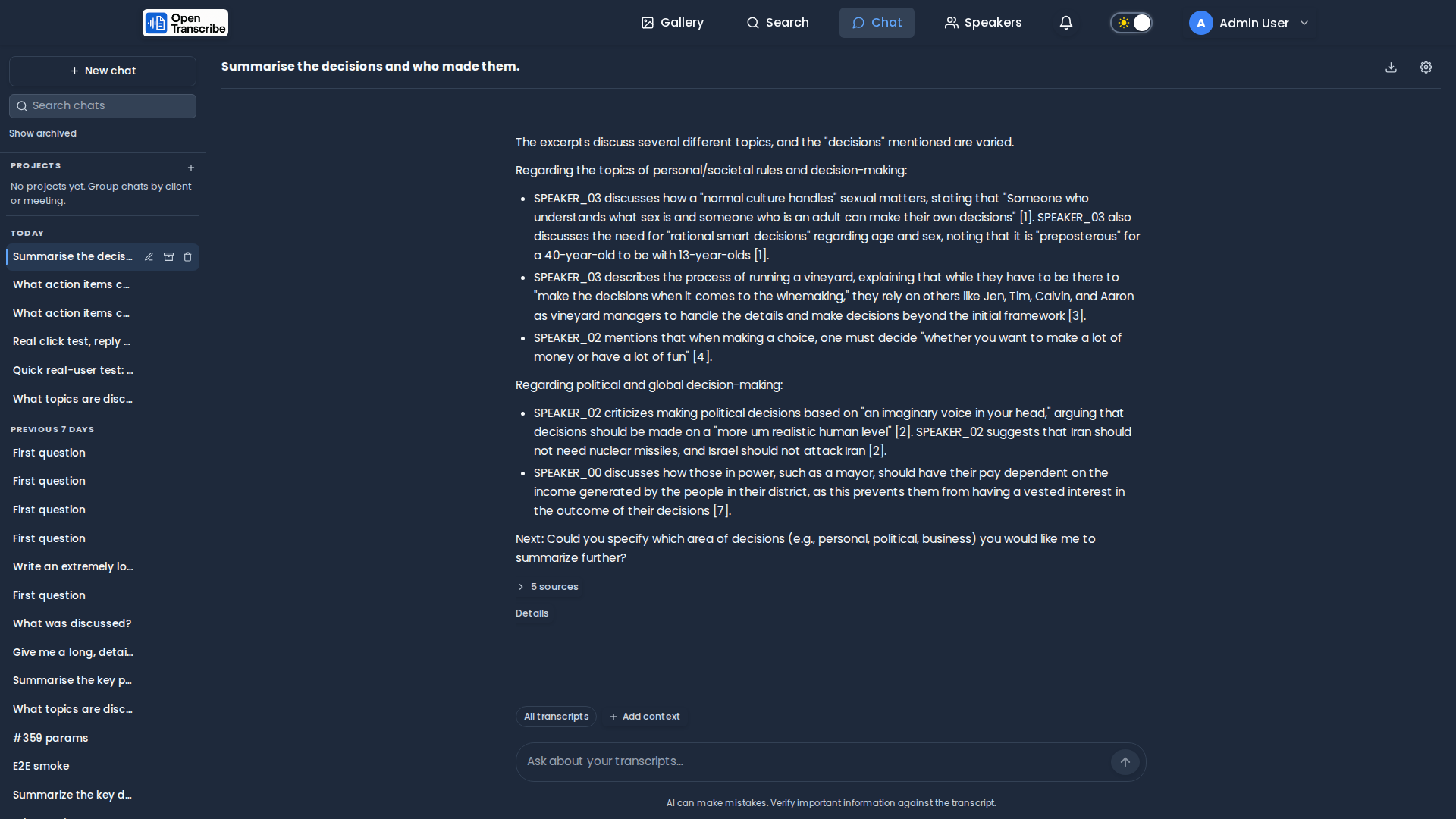
Every answer that uses your transcripts cites them with numbered markers like
[1], and lists the sources underneath. Each source card shows the recording,
the speaker, and the timestamp; clicking it opens that recording at that
moment in the player.
Citations are built from the retrieval results, never parsed out of the model's prose, so a citation always points where it claims to point.
If the excerpts do not contain the answer, the assistant is instructed to say so rather than guess.
Reasoning / thinking display
Some models stream their reasoning separately from the final answer. When the configured model supports that, its reasoning appears above the answer in a collapsed-by-default panel (Open WebUI-style) — expand it to see the model's intermediate thinking, or leave it collapsed and read only the answer.
Whether a model exposes reasoning at all is a measured, per-model capability, not a guess:
OpenTranscribe determines and records it rather than assuming every model of a given provider
behaves the same way. Where a provider streams reasoning through a dedicated field, that field
is what drives the display — vLLM/OpenRouter's reasoning_content/reasoning, Anthropic's
extended-thinking thinking_delta blocks, and Ollama's message.thinking. Providers with no
dedicated reasoning field are handled by an incremental <think>...</think> tag extractor that
reassembles a tag even when it is split across stream chunks, so unparsed thinking text never
leaks into the visible answer.
Working with a conversation
| Action | Where |
|---|---|
| Edit a question | Hover a question → pencil. The answer is regenerated from that point; later turns are retired, not deleted. |
| Regenerate | Hover the latest answer → circular arrow. |
| Stop generating | The send button becomes Stop while streaming, or press Escape. |
| Copy | Hover any message → copy. Code blocks get their own copy button. |
| Export | Download icon in the chat header — Markdown or JSON, with sources as deep links. |
| Rename / archive / delete | Hover a conversation in the sidebar. Archived chats stay available under Show archived. |
Keyboard shortcuts follow the usual conventions: Cmd/Ctrl+Shift+O starts a new
chat, Cmd/Ctrl+/ focuses the composer, and Escape stops generation.
Chat controls
The gear icon in the chat header opens per-conversation settings:
- Use my transcripts — turn context off to use the model as a plain assistant. The context bar shows an unmistakable Context off chip so an ungrounded answer never looks like a grounded one.
- Instructions for this chat — extra guidance for this conversation only (for example, "answer as a concise meeting summary, action items last").
- Creativity — lower values stay closer to what was actually said.
- Retrieval mode — three genuinely different searches:
- Hybrid (default) — keyword and meaning together, fused. Right almost always.
- Meaning — vector search only. Finds passages that say the same thing in different words; may miss a rare literal term like a product code.
- Exact words — keyword only. Use when you know the phrasing.
- Model — pin a different AI provider or model for this conversation only. Switching to one with a smaller context window warns first, since it silently changes how much of the conversation the model can see.
Under Advanced, collapsed by default because most people never need them:
- Answer length — the reply's token ceiling. Empty follows the model default. Longer answers cost more, and the server clamps the value to what the model and any plan limit actually allow rather than failing the request.
- Focus — narrows the words the model may choose from. Lower is more predictable. Leave it alone unless answers wander; it is omitted entirely when unset, because some models reject it.
Account-wide defaults for new conversations live in Settings → Chat. Any individual conversation can override them.
How instructions combine
Instructions are additive, applied broadest first:
built-in rules → your Settings → Chat default → the project → this chat
They answer different questions, so they stack rather than replace: "answer concisely" (yours) and "their product is called Atlas" (the project's) are both true at once. The built-in rules always come first and cannot be overridden by any of the layers above — that is what keeps transcript excerpts data rather than instructions.
Requirements
Chat needs a language model. Configure a provider in Settings → AI — OpenAI, Anthropic, OpenRouter, Amazon Bedrock, or a self-hosted vLLM / Ollama endpoint. Until one is configured, the chat page shows a setup prompt instead of a composer.
Retrieval uses the same OpenSearch index that powers search, so recordings must have finished transcribing to be searchable.
Privacy and safety
- Redaction is honoured. If you have redact before LLM enabled (or an administrator enforces it), retrieved excerpts are re-masked before they reach the provider, and the stored answer and citation snippets keep that masking. Masking fails closed: if a passage cannot be masked, it is withheld rather than sent.
- Your conversations are private. They are never shared with other users, and they are removed by GDPR erasure along with the rest of your data.
- Transcript content is treated as data, not instructions. Excerpts are delimited and the model is told explicitly never to follow directions found inside them, so a recording cannot hijack the assistant.
- Answers are rendered safely. Model output is sanitised, and links it writes can never point back into the application.
Administration
Settings → Chat → Advanced features tunes retrieval and limits for the whole
server. The tab is administrator-only and enforced server-side, not merely
hidden: the endpoints behind it require an admin, so a normal user cannot reach
them by other means. Every value applies to the next message — no restart, no
.env edit:
| Setting | Effect |
|---|---|
| Candidate excerpts | How many passages are retrieved before reranking. Higher finds more, costs time. |
| Excerpts per answer | How many reach the model. |
| Max excerpts per recording | Stops one long recording dominating a multi-file conversation. |
| Rerank excerpts | A CPU cross-encoder that re-scores passages for relevance. Adds latency and about 350–500 MB of memory on first use. |
| Rewrite follow-up questions | Expands pronouns and references ("what about her?") before searching. |
| Retrieval cache | Short-lived reuse of identical searches. |
| Messages per hour / concurrent replies | Per-user abuse controls. |
| Delete conversations after | Optional retention window (0 keeps them indefinitely). |
:::danger Reranking currently degrades retrieval quality
Measured evaluation found the shipped cross-encoder (cross-encoder/ms-marco-MiniLM-L-6-v2)
costs retrieval quality rather than improving it — 20.6% and 32.7% nDCG@10 regressions
across the two eval corpora (see developer-guide/rag-evaluation.md). The app's own in-app UI
surfaces a disclosure when this is detected. Leave "Rerank excerpts" disabled unless you've
verified on your own corpus that it helps.
:::
The reranker model (cross-encoder/ms-marco-MiniLM-L-6-v2, ~90 MB) is
downloaded by scripts/download-models.py. If it is absent, reranking disables
itself with a warning and chat continues to work, retrying every few minutes so
a model cache that appears later — a volume mounted after the container
started, for instance — is picked up without a restart.
Per-user preferences
Users can narrow two of these for their own chats in Settings → Chat: Excerpts per answer and Rerank excerpts. Both are ceilings, not overrides — a user may ask for fewer excerpts or turn reranking off, making their own chats cheaper and faster, but cannot exceed what you allow. Reranking is deliberately one-way: it can be switched off, never on when you have it off, since the model may not be installed at all.
A user's stored preference is kept even when it exceeds your current limit, so raising the platform value later restores their original intent instead of silently leaving them at the old ceiling.
How it works
Your question
  → rewritten into a standalone query (if it is a follow-up)
  → hybrid search over transcript chunks (keyword + meaning, RRF-fused)
  → ~48 candidates
  → reranked by a cross-encoder for relevance
  → sampled across files so no single recording dominates
  → ~12 excerpts, max 4 per recording
  → re-masked under your redaction policy
  → sent to your model with citation instructions, plus recent history
  → streamed back token by token
Transcripts are indexed as speaker-turn chunks, so a retrieved passage is a coherent stretch of one person talking rather than an arbitrary word window — which is what makes speaker attribution in answers reliable. See What the assistant actually sees for how a turn becomes an excerpt, and why that shapes the questions chat answers well.
Every number above is an administrator default, tunable per deployment under Settings → Chat → Advanced features.